How to Boost Your Video Editing
(Without Losing Your Mind)
Systems are what drive progress. Stop trying to juggle video editing
Yes, these frameworks work for all type of creatives (Ads, Reels, VSL, YouTube, even photos)
You filmed it. You were proud of it. And then it died on a hard drive.
That clip you shot three weeks ago, the one that was going to be great, is still sitting in a folder somewhere with a name like IMG_4471. Never edited. Never posted. Never seen.
Here is the uncomfortable truth. The footage was never the problem. The system was.
What is this costing you?
Most people think a messy video workflow just costs them time. It costs them more than that.
When your process is chaos, you stop posting. But when you stop posting, your audience forgets you exist. The content you worked so hard to create never does the one thing it was supposed to do, which is grow your business.
So the goal is not to edit faster. The goal is to build a system where nothing falls through the cracks. Here is how in 3 easy steps. Plus a bonus
Scroll to read how to fix this ⬇️
⚙️ The 3-Step Video Editing System
Step 1: Set The Standard
Has your editor ever delivered a video you hated, and you ended up correcting them a hundred times over? That stops here.
When an editor is not delivering what you wanted, it is one of two things. Honestly, sometimes a combination of both.
1. The editor genuinely sucks.
A lot of people are learning on amateur software like Canva or CapCut, which limits what they can actually do. Anyone can pick it up in a few hours and suddenly call themselves an editor. But the reality is that editing is a lot more than slapping on captions, music, and templated transitions.
2. You never set the standard.
Editors need to know what they are shooting at. Your inspirations, your brand elements, your purpose, your ICP. Without that, they are guessing. And guessing is where revisions go to multiply.
So how do you solve for number one? I wrote a separate guide on exactly how we hire every editor without missing the mark. [CLICK HERE].
And how do you solve for number two? You build a brand book. This becomes the GO TO document your editors open for every single video, and it sets the tone for Steps 2 and 3 below.
But here is the catch. A video editing brand book is not the same as your regular brand book. This is what we add in every single one we build for our clients:
Typography (primary and secondary fonts)
Colors (with Hex or RGB codes, no exceptions)
Music preference (the genres and beats you like)
Sound effects (meme-style, cinematic, or just generic swooshes)
Backgrounds and overlays
Competitors and peers (the ones you love and the ones you cannot stand)
Explain why on every example you grab.
Break down what makes their videos pop for you, down to the little details.
And here is something that might sound rude. Your editor's job is to make your video look sharp and grab attention. But if your storytelling and your value suck, there is no saving it. You need to sharpen your storytelling too.
We coach every client on this, but you can also read our guide on How To Tell A Story on Social Media.
You only build this once. You can always go back and tweak it. But from day one, this becomes your editor's trusty handbook, and revisions shrink because you finally get exactly what you want.
Step 2: Give Your Footage a Home
Right now your clips probably live in four places. Your phone, your laptop, a cloud drive, and that one external you can never find.
Pick one home. Then build five folders inside it: Raw Footage, B-roll, Assets, Work in Progress, and Ready.
TIP: We use software called Frame.io for this. It lets you stack versions of a video on top of one another, so every file stays in the same place and you can review changes from one edit to the next without losing track of anything.
The magic is not the folders themselves. It is that you can always see exactly where every video stands. Nothing gets lost because nothing is invisible.
It also means your editors, or you if you are still editing, never have to guess where to go. Need B-roll to enhance the story? You know where it lives. Looking for brand assets like logos or songs? Same. And the Work in Progress folder centralizes every video currently being edited, so you can track it all at a glance.
Bonus tip: name your files like a human will read them
MOV_4471 tells you nothing. Six months from now it will tell you even less.
Use a system instead. Title, version, type. Something like Funnel-v2-podcast.
It feels like a chore at first. But then you go looking for one clip from last month, and you find it in ten seconds instead of forty. That is when it pays off.
This becomes a lot easier once you implement step 3.
If you produce multiple types of videos like reels, podcasts, and ads, just like we do for our clients, create a subfolder for each type.
And if a short was extracted from a podcast, name it so you always know its origin. Something like Title, Source, version, type

If you’re a business owner and you’re sick of doing this all by yourself, let’s have a chat!
Step 3: Create A Way To Track Your Edits
You are a business owner. Systemizing is what got you here. So why are you not doing it for your content?
Building a system behind your videos is what lets you stop scrambling and start moving like a well-oiled machine. This is exactly how we edit hundreds of videos a week. Like a production line.
Video In → Straight Cut → Variations → Makeup → Quality Assurance → Posting
A video does not move to the next stage until the previous one is done. And here is the mistake I see constantly. People come to us starting at stage three, Makeup. They throw brand elements, captions, and B-roll onto a raw video that was never trimmed.
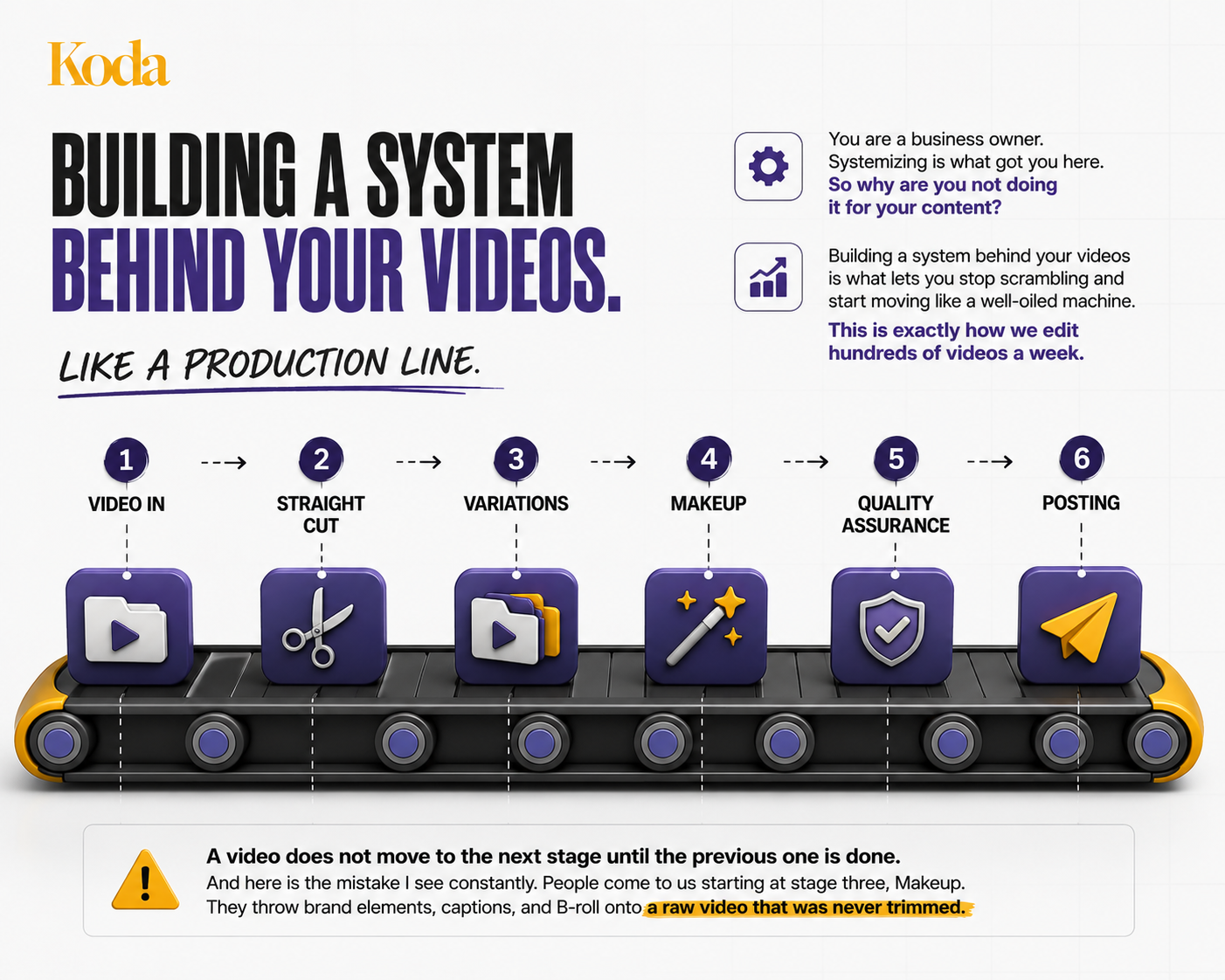
So what happens? They finish all that polish, then realize they need to cut pieces out, and now they are tearing apart work they already did. It costs time and it frustrates everyone involved.
If you hired an editor, that editor is now stuck in endless revisions because you decided after the makeup that you wanted a different cut. And if you are still editing yourself, a task that should have taken two hours just ate your entire day.
We run all six stages in this exact order for every video. Yes, all of the hundreds we produce every week go through it.
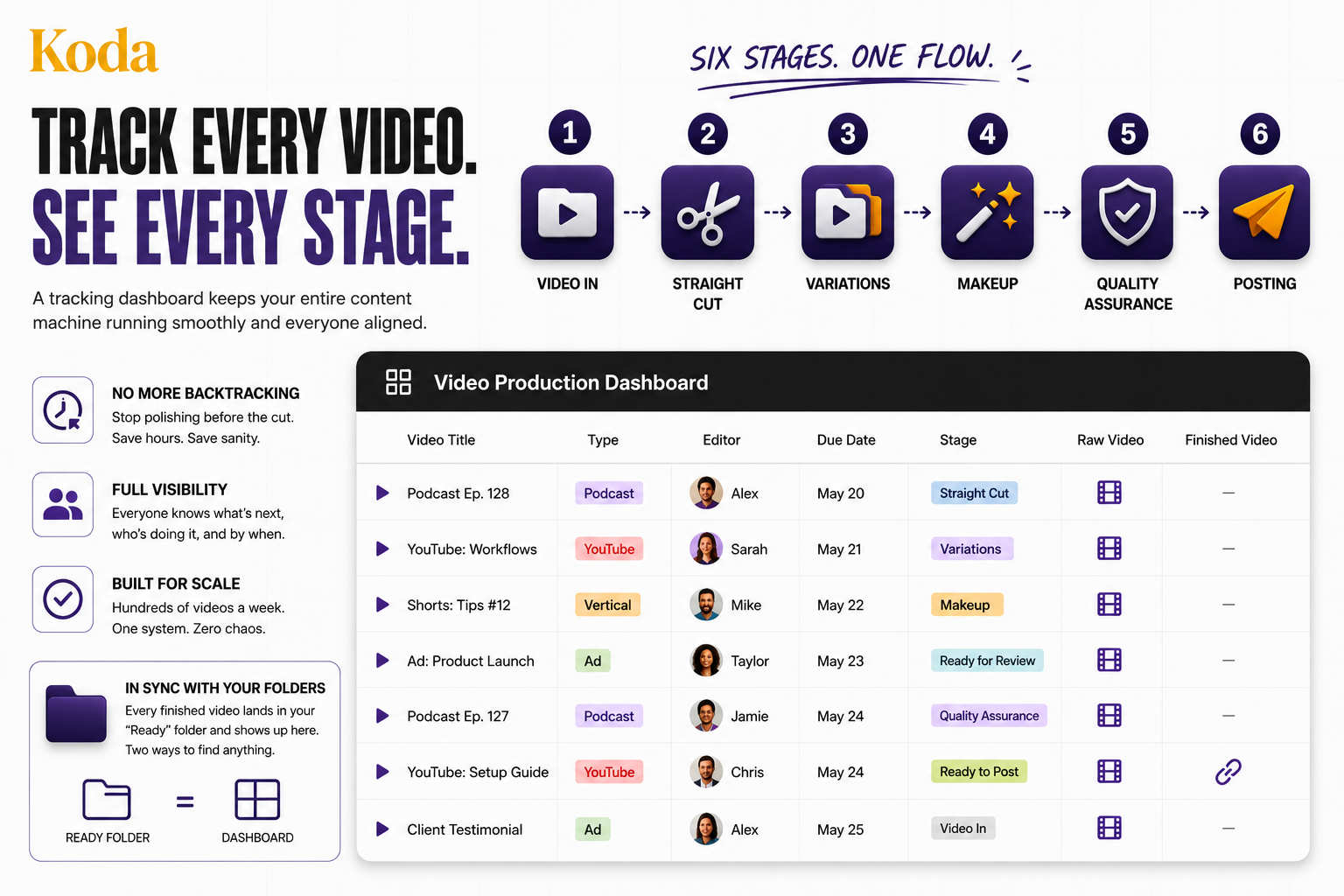
Okay, so you understand the stages. Now what? Easy. Build a tracking dashboard. Notion, a spreadsheet, or a task manager like Monday or ClickUp all work.
This dashboard should be visible to you, your editors, and anyone else touching content in your business. It should include the raw video link, the type (podcast, vertical, YouTube, ad), who is assigned to edit it, the due date, the finished video link, and most importantly, the stage the video is currently at (straight cut, variations, makeup, QA, or ready to post).
For our clients, we add a few extra stages. For example, we have team members who run only quality assurance, therefore we have a step that reads “ready for review”, which triggers our QA specialist to jump to it.
And remember those folders from Step 2? Every finished video lands there too. So you have it in a folder AND on the dashboard for future reference. Two ways to find anything.
Bonus: The Content Waterfall
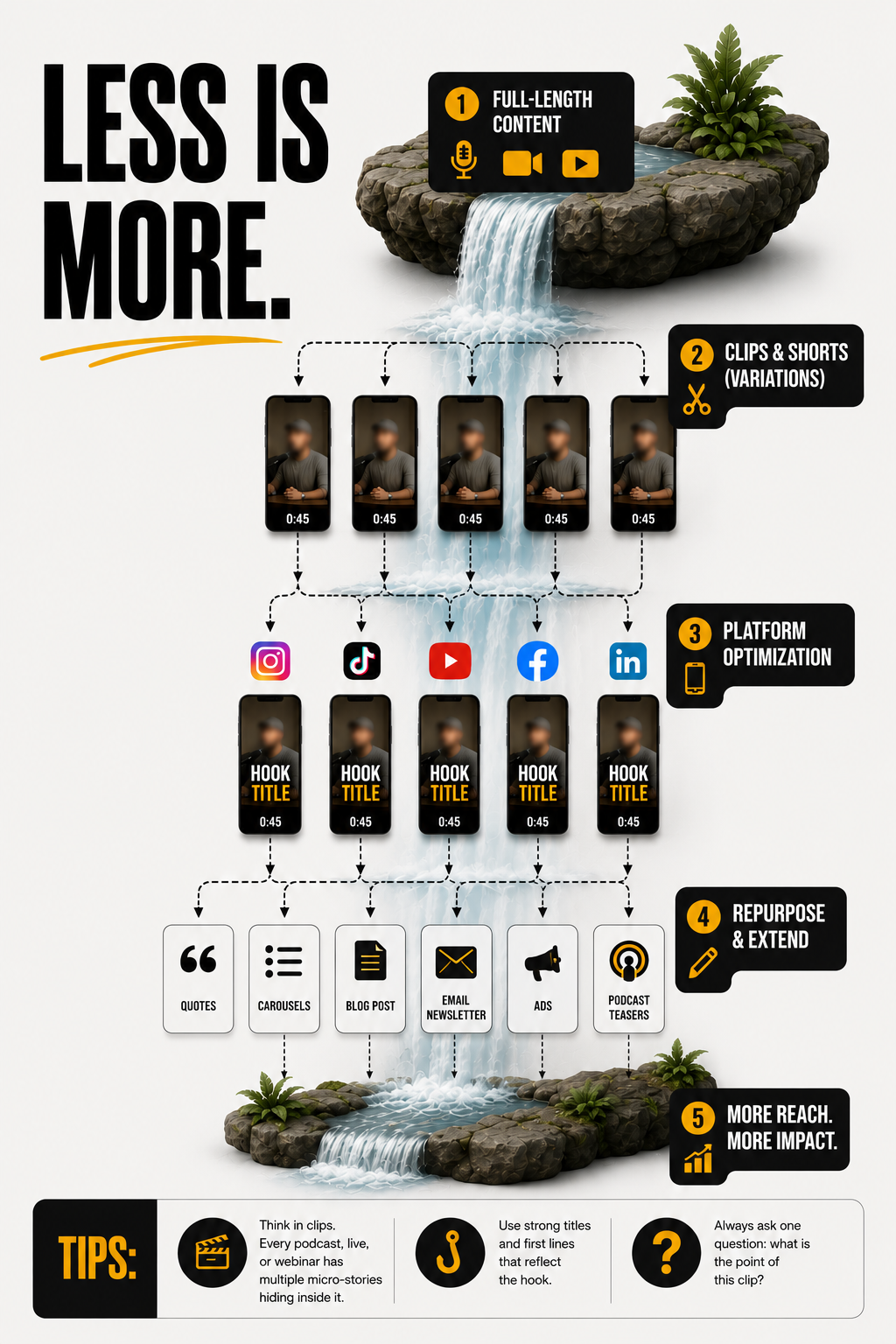
Less is more. But be intentional.
You now have your videos in one home and a system to track how they move. This is where you get to shine.
Recorded one podcast? Pull clips and shorts from it. That is the "Variations" stage from Step 3. Recorded a YouTube video? Cut shorts that work as a trailer for it.
A lot of our clients also sit down and record a "podcast" that will never see the light of day. Why? Because the whole point is to harvest shorts from it, more like a performance than an episode. Same logic applies to ads.
So now you have recorded a full month of content. How do you actually edit all of it? You already know. Follow Step 3.
Tips:
Think in clips. Every podcast, live, or webinar has multiple micro-stories hiding inside it.
Use strong titles and first lines that reflect the hook.
Always ask one question: what is the point of this clip?
Ready to skip the system building?
Everything above works. Plenty of business owners run it themselves and do great.
But it takes time, discipline, and a stomach for the parts of content that are not fun. And if you are being honest with yourself, those are probably the parts you keep putting off.
That is the exact job we do at Koda. We install a full editing team into your business, run this entire system for you, and turn your raw footage into 7 to 10 finished videos a week. You film. We handle the rest.
So if you would rather skip the building and just watch consistent content go out the door, let's talk.
Any Questions?
-
No, we will recommend best practices to optimize your organic or paid reach but will not guarantee views as it’s dependent upon your strategy and outreach.
-
Yes, you can increase your hours on batches of 10 weekly hours.
You’ll get invoiced based on the hourly rate of your active package. -
We recommend looking for a per-project independent contractor. Fiverr or Upwork are great resources for this.
-
No worries! All packages include unlimited revisions. Just remember, revisions count toward your booked hours.
-
We work exclusively with agencies, business owners, coaches, and educational institutes that create content for marketing, their own social media or internal use. We do not work with individual content creators.
-
We cover all editing software, music, B-roll, assets, and tools for project management and revisions.
If you need specific software, fonts, or assets, those will need to be provided by you.